Role of the main user
Find out more about the role of the main user and their permissions and responsibilities here.
In order to work in the Chemicals Product Register (RPC) after successfully creating your AGOV user account, the account must be linked to one or more reporting companies. Access to a reporting company always requires a user role:
General rules:
- Each reporting company must have at least one main user
- If a reporting company is newly linked to the RPC (i.e. the search entry for the reporting company does not have a green info box: already exists in the RPC) or is entered, the first AGOV user account that requests access to the reporting company must always be a main user. Only then can internal/external sub-users and additional main users be added.
How do you apply for the role of main user?
For information on opening a new AGOV user account in the RPC, including the access request, see: Opening a (CH login/AGOV) user account.
- The role of main user can be selected directly in the RPC after the reporting company has been specified.
- The application form must be signed by an authorised signatory of the selected reporting company as listed in the commercial register (Zefix).
- To activate the user account, send the application form in PDF format by email to cheminfo@bag.admin.ch.
- You will receive a confirmation email from RPC as soon as access has been granted or a rejection decision has been made
The correct role authorisation is always the responsibility of the registering company signing the form.
Please note that
- a registering company can have several main users
- A main user does not necessarily have to work in Switzerland. However, we recommend that at least one person who works for the reporting company holds the role of main user
What are the responsibilities of a main user?
The main user has administrative rights within the RPC. Unlike sub-users, they can do the following for the reporting company:
- Authorise access requests from sub-users
- Manage all access permissions for sub-users, e.g. change or deactivate the role of the internal vs. external sub-user
- Submit forms and applications for biocides and fertilisers that have been pre-filled externally by a sub-user
However, the main user cannot do the following in the RPC for the reporting company:
- Open an user account AGOV on behalf of another person (neither main user nor sub-user), including an access request.
- Automatically access all confidential product information (authorship)
- Manage company data
How can you authorise new sub-users?
How can you request and manage additional access to a registration company for your AGOV user account?
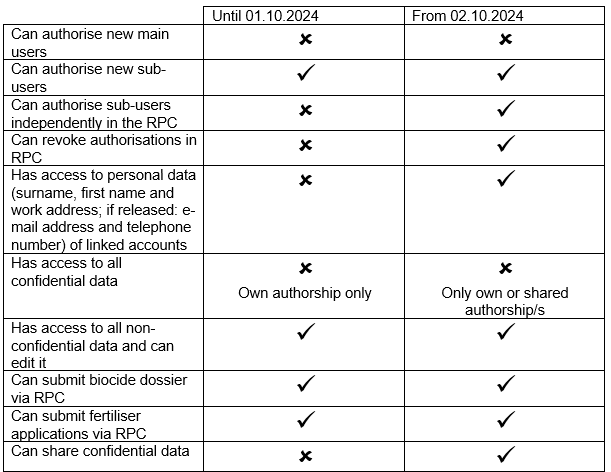
Migration and summary of permissions between versions 4.6 and 4.7 of RPC
With the release (Release Note) of version 4.7 of RPC, user management has been updated. The role of the main user has been migrated to the new version and its permissions have been adjusted as follows: